Upscale Image with AI
Upscale images up to 4x with AI. Sharpen details and boost resolution — no subscription, no watermark.
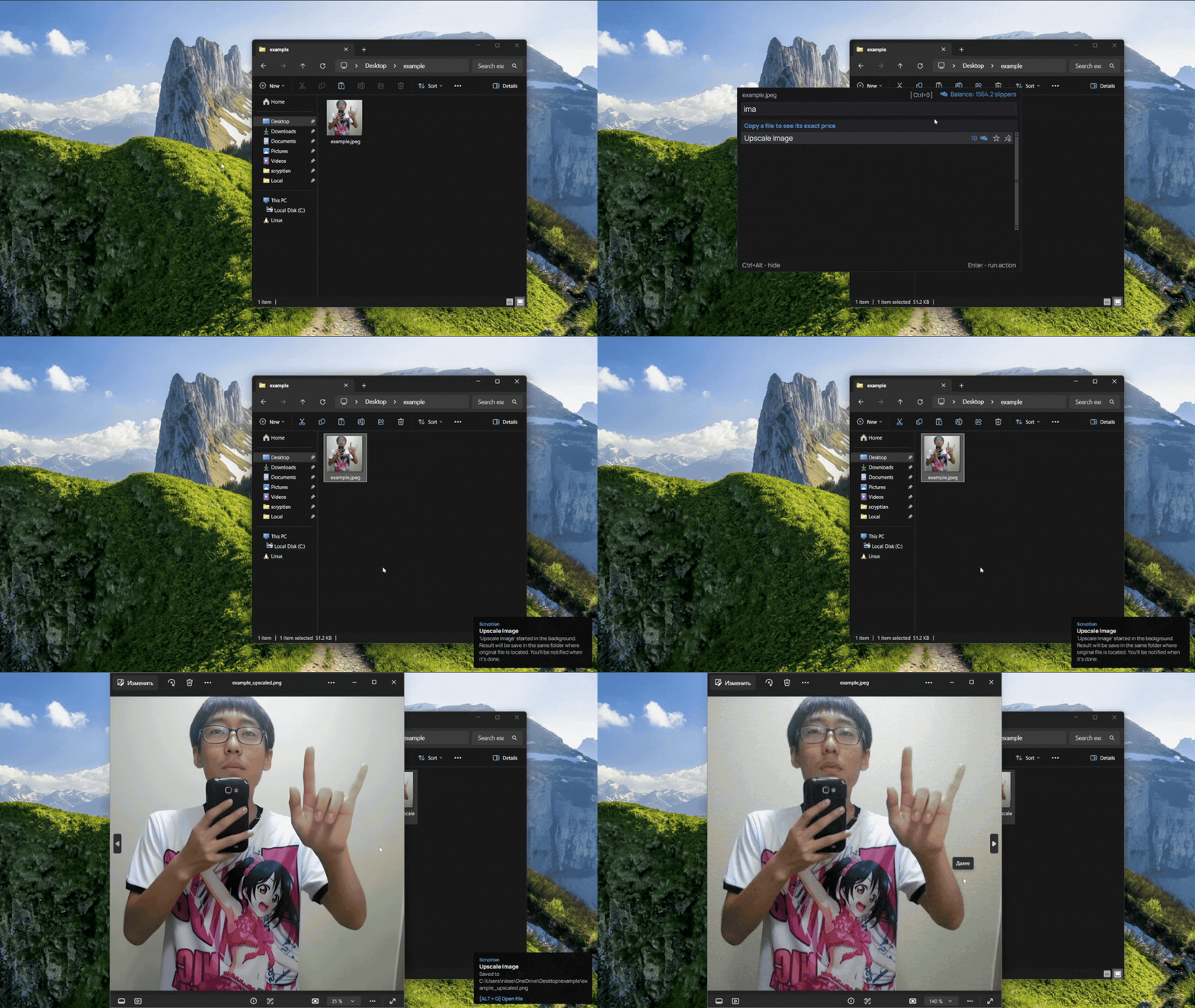
What this action does
- 4x AI upscaling (Real-ESRGAN)
- Optional face enhancement
- Reconstructs sharp edges and textures
- Full-quality result, no watermark
- Pay per result — no subscription
Turn blurry or low-resolution images into sharp, high-resolution ones. Scryptian's AI upscaler enlarges photos up to 4x and reconstructs fine details — edges, textures, and faces — so the result looks genuinely sharper, not just bigger. Great for old photos, screenshots, AI art, and product images. No signup or subscription, full quality, no watermark — pay only for the result.
How it works
- 1
Download
Free app for Windows.
- 2
Copy a file
Select any file
- 3
Press Ctrl+Alt
The bar opens over your file.
- 4
Pick this action
Done. Pay only for the result.
- 5
Result file
Result files appears in the same place where original.